2 — Subgraph & FASTA Extraction
Biological question: How can I visualize a specific genomic locus across all haplotypes, using coordinates from a non-reference sample? Can I also retrieve the corresponding FASTA sequences for downstream analyses?
This use case illustrates the subgraph and FASTA extraction features of GraTools, applied to the Sub1 locus on chromosome 9 of the Asian Rice PVG [Marthe et al., 2025]. This locus spans more than 150 kb and harbors three genes: Sub1B, Sub1C (present in all 13 accessions), and Sub1A (present in only 4 accessions, including IR64), which is responsible for submergence tolerance in Asian rice [Xu et al., 206].
A key advantage of GraTools is that no re-indexing is required when switching the coordinate system from one haplotype to another. The internal data structure handles all coordinate translations natively.
The examples below use the graph NewRiceGraph_MGC.gfa.gz, built using the Nipponbare
genome (IRGSP) as reference, but IR64 coordinates are used here to define the region of interest.
Step 1: Extract Subgraph (IR64 Coordinates)
Use the get_subgraph command with --sample-query to specify the query sample (IR64) and
--chrom-query to provide the chromosome name as it appears in the IR64 haplotype:
gratools get_subgraph \
  --gfa NewRiceGraph_MGC.gfa.gz \
  --sample-query OsIR64RS1 \
  --chrom-query CM020884.1_OsIR64RS1_chromosome9 \
  --start-query 7400227 \
  --stop-query 7800003 \
  --all-samples
--sample-query: the sample whose coordinate system is used for the query--chrom-query: chromosome name in the query sample--all-samples: include all 13 haplotypes in the output subgraph--start-query/--stop-query: genomic coordinates in the query sample
The output is a GFA file containing the subgraph for the Sub1 locus, with node names identical to the original GFA for seamless integration with downstream tools such as Bandage [Wick et al., 2015].
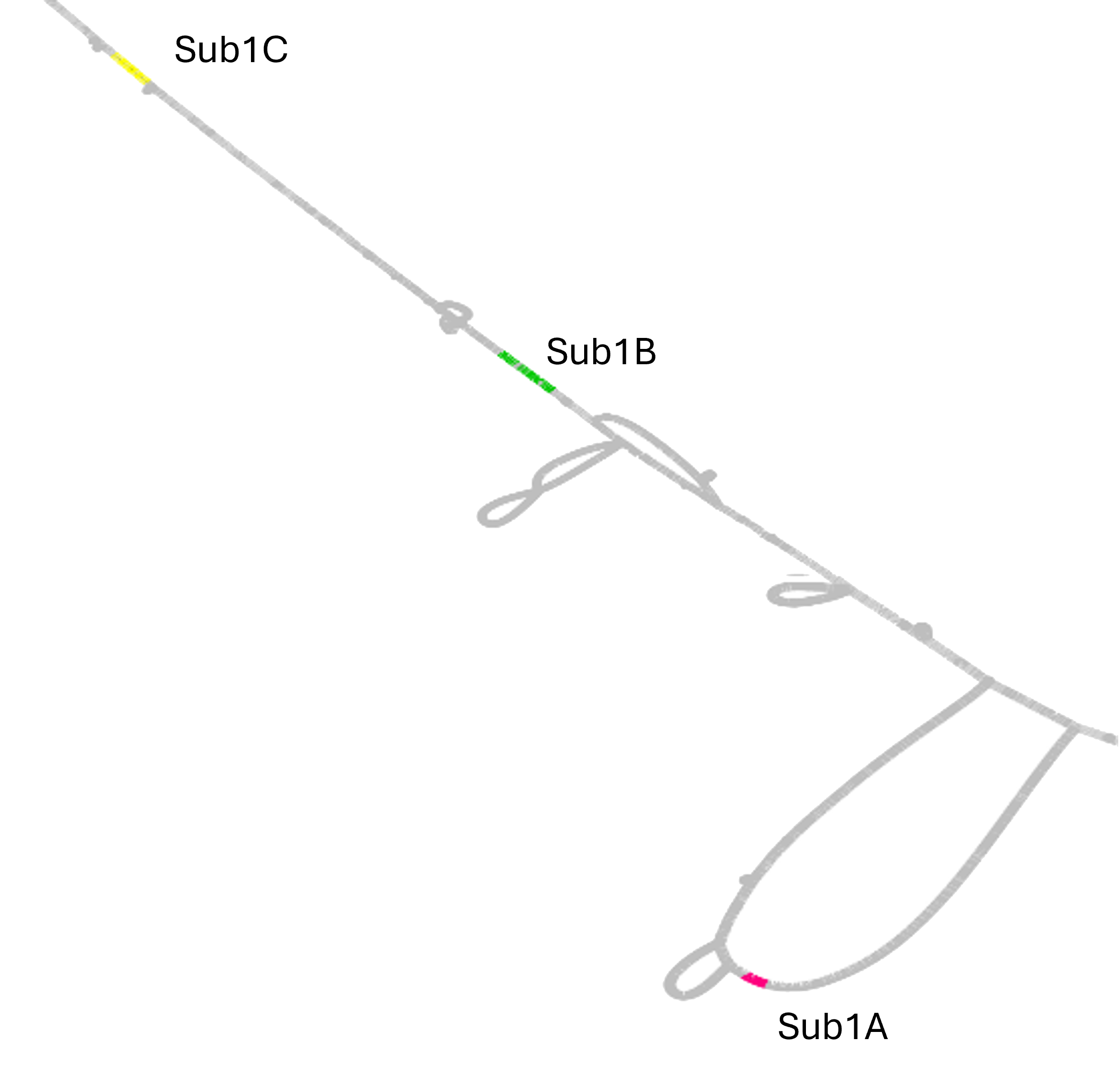
Bandage layout of the Sub1 locus in the Asian Rice PVG. Sub1C (yellow), Sub1B (green), and Sub1A (pink) are highlighted. Sub1A is present in only 4 of the 13 accessions.
Step 2: Same Subgraph with Reference Coordinates
The exact same subgraph can be obtained using the Nipponbare reference coordinates instead:
gratools get_subgraph \
  --gfa NewRiceGraph_MGC.gfa.gz \
  --sample-query IRGSP \
  --chrom-query Chr9 \
  --start-query 6328847 \
  --stop-query 6673971 \
  --all-samples
The two resulting subgraphs are structurally identical, except for the first node of the IR64 haplotype, which represents an IR64-specific single-base variant at the boundary of the queried region.
Note
GraTools can use any embedded haplotype as a coordinate reference, not just the one originally used to build the PVG. No re-indexing is needed.
Step 3: Restrict to a Subset of Samples
Instead of including all samples (--all-samples), provide a text file listing the samples
to include (one name per line):
OsIR64RS1
IRGSP
AzucenaRS1
gratools get_subgraph \
  --gfa NewRiceGraph_MGC.gfa.gz \
  --sample-query OsIR64RS1 \
  --chrom-query CM020884.1_OsIR64RS1_chromosome9 \
  --start-query 7400227 \
  --stop-query 7800003 \
  --samples-list samples_to_extract.txt
Step 4: Also Extract FASTA Sequences
To retrieve FASTA sequences alongside the subgraph GFA, add the --build-fasta option:
gratools get_subgraph \
  --gfa NewRiceGraph_MGC.gfa.gz \
  --sample-query OsIR64RS1 \
  --chrom-query CM020884.1_OsIR64RS1_chromosome9 \
  --start-query 7400227 \
  --stop-query 7800003 \
  --all-samples \
  --build-fasta
If you only need FASTA sequences (without the GFA subgraph), use the dedicated get_fasta
command:
gratools get_fasta \
  --gfa NewRiceGraph_MGC.gfa.gz \
  --sample-query OsIR64RS1 \
  --chrom-query CM020884.1_OsIR64RS1_chromosome9 \
  --start-query 7400227 \
  --stop-query 7800003
Note
When using get_fasta, the query sample used to define coordinates does not need
to be included in the FASTA output. You can query coordinates from one haplotype and
extract sequences from a different set of haplotypes.
Summary
Command |
Description |
|---|---|
|
Extract a subgraph for all haplotypes using any sample’s coordinates |
|
Extract a subgraph restricted to a list of samples |
|
Also output FASTA sequences for each path in the subgraph |
|
Extract only FASTA sequences for a given genomic region |
See also
1 — Graph Description — Graph description
3 — Core/Dispensable & Groups — Core/Dispensable genome analysis
4 — Advanced Pangenome Size Analysis — Advanced pangenome size analysis